How can we help you?
Most helpful questions
Promotional methods
-
partsmallgh.com provides users with three main promotional methods where sellers use PartsMallGh credit to promote their items at will:
- You give your item a special tag, a golden background and place it at the top of all listings and search results inside a beautiful slider for 14 days
Move to Top
- You can manually move your item on top of all the latest listings after every 3 days 3 days
Highlight Ad
- By default, all items have a white background colour. When you highlight, you given your item a unique background colour to make it stand out among the lot for 7days
How to Promote an Ad
-
To promote your item, you need to:
-
Login or Register an account with partsmallgh.com
-
Click on the ‘Promote your Items’ button which can be located when you click on your account name on the top bar or below your account name in the footer
-
On mobile browsers, you will have to select the ‘Menu button’ at the top-left of your screen and then click on your account name to show the ‘Promote your Items’ button
-
Once you have selected ‘Promote your Items’, you will be redirected to a page where you will have an overview of all your published items and options to either (Make Special), (Move to Top) , or (Highlight Ad) for each item.
-
Select your desired promotional method and get redirected to a checkout page.
-
You will be required to pay for the promotional method(s) for the selected item(s) using PartsMallGh credits or cash.
-
You can also promote an item when you view it while logged in.
-
And also, you can promote an item while publishing it.
- You can also choose to extend your promotions or add on other kinds of promotions.
- Promotions cannot be cancelled once paid for.
Promo charges
-
The carges for the promotional methods are paid with PartsMallGh credits. See below:
| Method | Units Charged | Can be done by | Number of days |
| Make Special | 120 units | Yourself or Moderator | 14 days |
| Move to Top | 5 units | Yourself or Moderator | 1 day |
| Highlight Ad | 20 units | Yourself or Moderator | 7 days |
| Side Adverts | Negotiable | Moderator | Negotiable |
Seller Group Memberships
About Membership Groups
-
partsmallgh.com has introduced memgership groups whrere sellers use PartsMallGh credit or actual cash to to join a group for a specific period. In doing so, you receive special benefits and exclusive deals.
Seller also earns the group badge on their items and also become eligible for the Verification badge. After registeration, you are limited to a maximum number of two(2) items which you can publish to go live but joining a group gives you more plus other benefit:
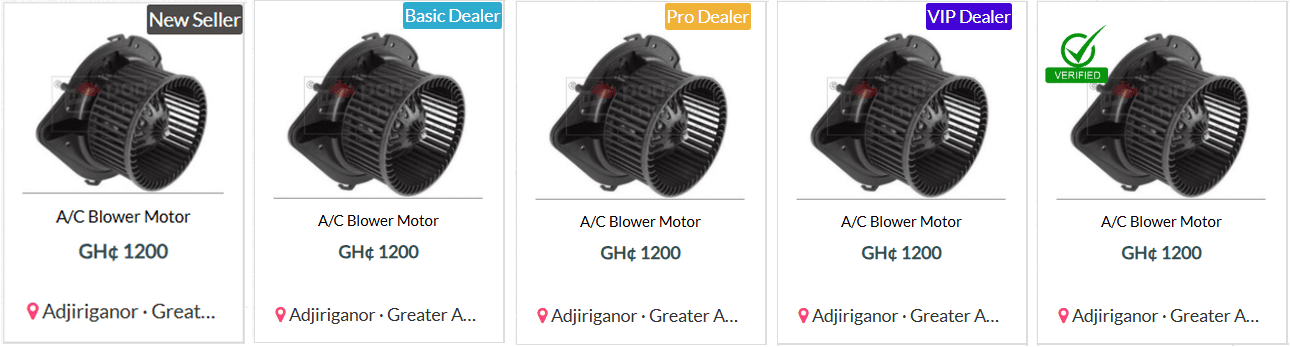
New Seller group
- This group is for casual sellers who intend to offload a few spare parts. You can have up to five(5) live listings.
Basic Dealer group
- This group is for individuals selling few items and potential dealers. You can have up to ten(10) live listings.
Pro Dealer group
- This group is for a start up to mid level spare parts dealer selling average quantities. You can have up to thirty(30) live listings.
VIP Dealer group
- This group is for an experience and renowned spare parts dealer selling huge quantities accross the country. You can have up to one hundred and fifty(150) live listings.
Seller Verification badge
- This badge is earned only after seller submits their National ID or Business Certificate.
How to Join a Group
-
Joining a group is fairly easy, you need to:
-
Login or Register an account with partsmallgh.com
-
Click on the ‘Membership’ button which can be located when you click on your account name on the top bar or below your account name in the footer
-
On mobile browsers, you will have to select the ‘Menu button’ at the top-left of your screen and then click on the ‘Membership’ button
-
Once you have selected ‘Membership’ , you will be redirected to a page where you will have an overview of all the available membership groups&nbs.
-
Chose your desired group by clicking on the 'Become member' button after which you will be redirected to a checkout page to complete payment with your partsmallgh credits or with cash.
-
If you are already a member of a group, the message on your current group will be 'Extend Membership' whiles higher groups will have an 'Upgrade Plan' message.
-
-
Lower groups will not be available and will appear faded out until you exhaust your current group period.
Membership Benefits
-
The partsmallgh.com memgership groups come with imense benefits in addition to increasing your maximum number of items to post.
New Seller group
- • You get five(5) maximum listings
- • You gain two(2) free listings
- • You receive a 1 units bonus credit every month.
- • You earn a 'New Seller' Group badge on all your items which boosts buyer confidence
- • You become eligible for a 'Verified' Badge which boosts buyer confidence
Basic Dealer group
- • You get ten(10) maximum listings
- • You gain five(5) free listings
- • You receive a 5 units bonus credit every month to move an item to the top.
- • You earn a 'Basic Dealer' Group badge on all your items which boosts buyer confidence
- • You become eligible for a 'Verified' Badge which boosts buyer confidence
Pro Dealer group
- • You get thirty (30) maximum listings
- • You gain ten(10) free listings
- • You receive a 45 units bonus credit every month to highlignt two(2) items and move an item to the top.
- • You earn a 'Pro Dealer' Group badge on all your items which boosts buyer confidence
- • You earn Exclusive credit packages for Pro Dealers(Pro Starter,Pro Mega) with huge bonuses
- • You become eligible for a 'Verified' Badge which boosts buyer confidence
VIP Dealer group
- • You get One hundred and fifty(150) maximum listings
- • You gain Hundred (100) free listings
- • You receive a 140 units bonus credit every month to make one(1) item special and to highlignt two(2) items.
- • You earn a 'VIP Dealer' Group badge on all your items which boosts buyer confidence
- • Your business is put on the dealer spotlight which makes it appear on all pages that matter for easy access.
- • You earn Exclusive credit packages for VIP Dealers(VIP Starter,VIP Mega) with much bigger bonuses
- • You earn a full business profile page which allows you to display your social media handles, your business working hours, a picture gallery for your store, your means of finiancial transaction, any notices to customers etc.
- • You have the option of adding 4 extra phone numbers for your extra branches with their phone numbers included.
- • You become eligible for a 'Verified' Badge which boosts buyer confidence
Membership Fees
-
The Fees for the various membership groups can be paid with PartsMallGh credits or cash. See below:
| Group | Amount Charged | Can be done by | Minimum Number of days |
| New Seller | 5 units | Yourself or Moderator | 30 days |
| Basic Dealer | 30 units | Yourself or Moderator | 30 days |
| Pro Dealer | 120 units | Yourself or Moderator | 30 days |
| VIP Dealer | 500 units | Yourself or Moderator | 30 days |
Publish Item
To sell or post an item on partsmallgh.com, you need to first and foremost be a registered and activated member.
-
Whiles on our webpage, you can locate and select the Sell button on the nav-bar at the top-right corner of our webpage for both mobile and PC users or at the foot of the page under the ‘Welcome’ widget.
-
On mobile browsers however you can also locate it after you select the Menu button at the top-left corner of the page.
-
Once you select the Sell button you will be redirected to a new page where you will be required to enter the item details and a few extra details about yourself.
-
You must have already read and agreed with our terms of service by then so you will tick the checkbox provided and then select the publish button.
Note:
If you have not logged in or registered an account with us before tryin to publish an item, you will be redirected to different page to do so to enable you to sell.
Edit Item
-
You can edit your item once you are logged in by viewing the item on the item page and selecting the ‘Edit’ option under the item description.
Note:
The ‘Edit' option will only be accessible if you are logged in. You can also edit an item from your Dashboard.
In need of further assistance? Contact us
How to Buy
-
To buy PartsMallGh credits, you need to first log into your account.
-
Then select the Buy Credit button at the top-right side of the page.
-
You can also find this button at the footer, below your account name.
-
For mobile browsers, you can find the Buy Credit button after you select the Menu button at the top left corner or at the footer under your account name.
-
On selecting the Buy Credit button, you will be redirected to the Pack menu page where you will have a list of five different credit packs to choose from
-
Select your desired pack by clicking on the 'Buy this pack' button
-
Once you click to buy, you will be redirected to a check out page for an overview of your purchase order.
-
On the checkout page, you can go back to add more packs
-
You can also delete unwanted packs on the checkout page
-
When you are ok with what you want to buy, click on the 'Pay Now' button to get directed to our secured payment service page.
-
You then have to confirm your purchase and select a payment option:
-
Mobile payments : MTN mobile money, Tigo Cash, Vodafone Cash and Airtel Money
-
Card Payments : Visa payment, Master Card and American Express
-
Once you enter your details correctly for the selected payment method and confirm payment, you are redirected to our 'payment completed' page and the purchased credit Pack is automatically added to your balance.
-
Note
-
You can also buy packs by visiting your dashboard and selecting 'Buy Credit' in the menu options.
Credit Packs
We have 5 different credit packages that you can purchase:
| Package | Cost(GHS) | Units Received | Bonus Received |
| Vendor's Pack | 5 GH₵ | 10 units | 2 units |
| Seller's Pack | 10 GH₵ | 20 units | 5 units |
| Trader's Pack | 20GH₵ | 40 units | 10 units |
| Merchant's Pack | 50 GH₵ | 100 units | 20 units |
| Dealer's Pack | 100 GH₵ | 200 units | 50 units |
| Exclusive Pro Starter Pack | 250 GH₵ | 250 units | 150 units |
| Exclusive Pro Mega Pack | 400 GH₵ | 400 units | 400 units |
| Exclusive VIP Starter Pack | 500 GH₵ | 500 units | 500 units |
| Exclusive VIP Mega Pack | 1000 GH₵ | 1000 units | 1500 units |
Note: 1 unit costs 1 GH₵
-
In need of further assistance? Contact us
- Search for item
-
The easiest way to find an item on partsmallgh.com is to type the item name or a brief description into the top search bar and search.
-
On mobile browsers however, you need to select the search icon on the menu-bar to reveal the search bar.
-
You can make the search more specific by selecting a category and a location
-
The search results are displayed at the Search page where you can further refine your search.
-
The extra filters that will show on the Search page side bar are all category sensitive and comes in forms such as dropdowns, text fields, checkboxes and radio buttons.
-
In mobile browsers however, the filters are hidden so a button has been provided to show the hidden filters
-
With the aid of the provided filters for enhancing your search, you should be able to find the item you need, view it and contact seller accordingly.
Note:
-
There are two different kinds of filters,the ones which appear for all categories and the ones which appear when certain categories are selected
Filters for all categories
-
The below filters appear on the search side bar when any category is selected
-
Price (Slider): updates results to show items being sold within a specific price range
-
Waranty (checkbox): updates results to show only items being sold on warranty
-
Item Condition(radio button): updates results to show only new or used items
-
Price flexibility(radio button): updates results to items with fixed or negotiable prices
-
Category(dropdown): updates results to show items in a specific category
-
Location(text field): updates results to show items in a particular region or city/market
-
Deliverable(text field): updates results to show items that can be delivered by seller
Filters for selected categories
-
The below filters appear only when certain categories are selected
-
Rims(dropdown): updates results from the category ‘Rims’ by rim specifications
-
Tires(dropdown): updates results from the category ‘Tires’ by tire specifications and brand
In need of further assistance? Contact us
Registration
-
Whiles on our webpage, you can locate and select the Register button on the nav-bar at the top of the webpage or at the foot of the page under the ‘My account’ widget.
-
On mobile browsers you will locate it after you select the Menu button at the top-left corner of the page.
-
On accessing the registration page, you will be required to enter the following credentials:
-
Your Name * (it culod be a company’s name or a person’s name)
-
Password* and Password confirmation*
-
Email address*(please make sure you provide a valid email address)
-
Seller type* (chose if you should be recognized as a company or as an individual)
-
Telephone number*(this is the easiest way for customers to reach you)
-
Website (optional)
-
Profile picture( it could be a company logo or any picture to help you sell your items)
-
You will then have to agree to our Terms of service by ticking the check box on the register page.
-
You can now click the register button and wait for a verification email. Once this email is received, click on the activation link inside the mail to activate your account.
-
You are now ready to sell at partsmallgh.com
Note:
-
You can also register through Facebook, Google or Twitter if you have an account on those social networks
-
You should be 18 years and above or a registered company to register and sell from our website.
-
Fields marked with asterix (*) are mandatory and must be valid to enhance your trading activities.
Login
-
To login, you simply have to click on the login button at the top-right side of the page or at the foot of the page under the ‘My account’ widget.
-
On mobile browsers you will locate it after you select the Menu button at the top-left corner of the page.
-
On selecting the login button, you will be required to input your user name and password and you should get logged in after submission of credentials.
Note:
-
You can also login with Facebook, Google or Twitter if you have an account on those social networks
-
You can check out our tutorials on How to post an ad
-
In need of further assistance? Contact us
Manage Account
-
To manage your user account, you need to first log into your account.
-
Once you login, the 'login' button at the top will change to your user name with your profile picture by it. Select this button to view a dropdown menu of your account options.
-
Select one of your account options to access your dashboard where you can edit your account information and view your Alerts
Note:
-
A Store (Dashboard) is provided for every registered and activated account.
-
You can also find the 'My Account' button at the footer of the page.
-
On mobile browsers, you will locate it after you select the Menu button at the top-left corner of the page.
Manage Item(s)
-
From your dashboard, you can edit, manage and view all your items being sold.
-
You can also edit an item when you view it from the search page whiles logged in.
-
You can also see the number of views for an item and check the number of times your phone number was viewed for a particular item.
In need of further assistance? Contact us
Promote Your Item
Promotional methods
Here at partsmallgh.com, we provide users with three main promotional methods where sellers use PartsMallGh credits to promte their items at will.
We have the following:
-
-
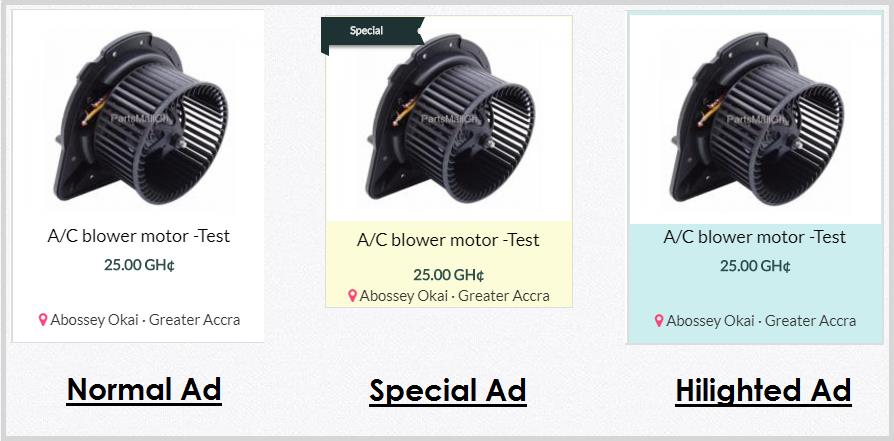
Make Special
When you chose this method, your item is given a special tag, a golden background and placed at the top of all listings and search results inside a beautiful slider for 12 days -
Move to Top
When you use this method, your item is automatically moved to the top of all the latest listings -
Highlight Ad
By default, all items have a white background colour. When you highlight, your item is automatically given an attractive background colour to make it stand out among the lot for 10 days
-
Side Adverts
We also provide a special promotional advertisement banner which has been placed at the side bar of all the relevant pages to ensure customers see your ads on whichever page they are.
You can only apply for this method by contacting our Support team
Promo charges
You pay the charges for the various promotional methods with PartsMallGh credits. Please see below:
| Method | Units Charged | Can be done by | Number of days |
| Make Special | 140 units | Yourself or Moderator | 14 days |
| Move to Top | 5 units | Yourself or Moderator | 1 day |
| Highlight | 20 units | Yourself or Moderator | 7 days |
| Side Adverts | Negotiable | Moderator | Negotiable |
Credit Packs
We have 6 different credit packages that you can purchase and there are exclusive packages for the respective seller groups:
| Package | Cost(GHS) | Units Received | Bonus Received |
| Vendor's Pack | 5 GHS | 5 units | 2 units |
| Seller's Pack | 10 GHS | 10 units | 5 units |
| Trader's Pack | 20GHS | 20 units | 10 units |
| Merchant's Pack | 50 GHS | 50 units | 20 units |
| Dealer's Pack | 100 GHS | 100 units | 50 units |
| Premium Pack | 200 GHS | 200 units | 100 units |
| Exclusive Pro Starter Pack | 250 GHS | 250 units | 150 units |
| Exclusive Pro Mega Pack | 400 GHS | 400 units | 400 units |
| Exclusive VIP Starter Pack | 500 GHS | 500 units | 500 units |
| Exclusive VIP Mega Pack | 1000 GHS | 1000 units | 1500 units |
Note: 1 unit costs 1 GH₵
 Home
Home Become VIP
 Contact Us

 X
X